Last month we used it to publish the first drop of the ASP.NET MVC source code. This first drop included the source for the ASP.NET MVC Preview 2 release that we shipped at MIX, along with Visual Studio project files to enable you to patch and build it yourself.
A few hours ago we published a refresh of the ASP.NET MVC source code on the site. This source refresh is not an official new ASP.NET MVC preview release - instead it is an interim drop that provides a look at the current state of the source tree. We will ship the official "ASP.NET MVC Preview 3" release in a few weeks after we finish up some more work (more features and tweaks to existing ones, better VS tool integration, VS express edition support, documentation, etc). If you are someone who wants a hassle-free installation of ASP.NET MVC to use that ships with documentation and full tool support you'll probably want to wait for this official preview release. If you are someone who wants a chance to see an early "preview of the preview" and have the opportunity to start using and giving feedback on some of the features immediately, today's source refresh is probably interesting to look at.
Improvements with this ASP.NET MVC Source Refresh
This week's update (which you can download here) includes a number of improvements to ASP.NET MVC. Some of these include:
*
In addition to posting the source code for the ASP.NET MVC framework, we are also posting the source code for the unit tests that we use to test it. These tests are implemented using MSTest and the open source Moq mocking framework. A VS 2008 project file for the unit tests is included to make it easy to build and run them locally within your VS 2008 IDE.
*
Significantly easier support for testing Controller classes. You can now unit test common Controller scenarios without having to mock any objects (more details on how this works below).
*
Several nice feature additions and usability improvements to the URL routing system (more details below).
Creating a New ASP.NET MVC Project]
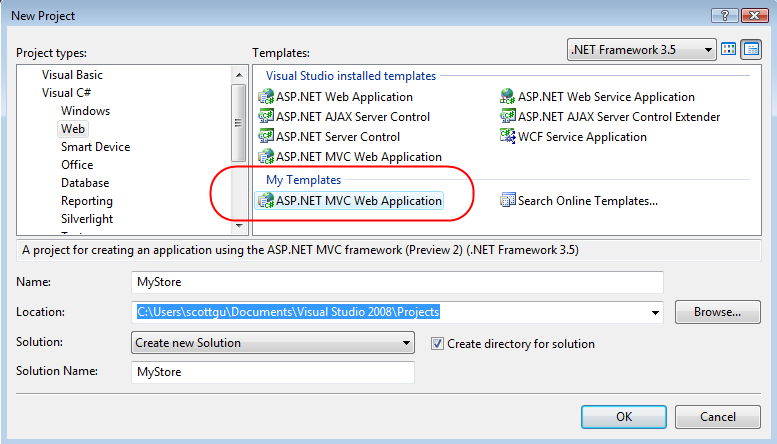
You can build your own copy of the ASP.NET MVC assemblies by downloading the MVC source and compiling it locally, or alternatively you can download a VS Template package to get a pre-built version of them along with a Visual Studio project template that you can use to quickly build a new ASP.NET MVC Project that uses the latest bits.
After you install the ASP.NET MVC source refresh .VSI template, a new "ASP.NET MVC Application" project template will show up under the "My Templates" section of your "New Project" dialog:
This new "My Templates" version of the MVC project template lives side-by-side with the previous ASP.NET MVC Preview 2 release (which you can see above it in the main project templates section of the dialog). This allows you to safely create new projects and and use both the latest source version and the last official preview version on the same machine.
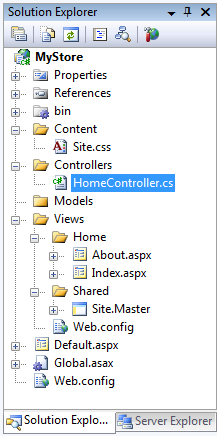
When you create a new project using this updated ASP.NET MVC Project template you'll by default get a project that looks like below:
This new project solution contains one Controller ("HomeController") under the "\Controllers" directory and two View templates ("About" and "Index") under the "\Views\Home" sub-directory. Both view templates are based on a common master page for the site ("Site.master"), all of whose styles are defined within a "Site.css" file under the "\Content" directory.
When you run the application the built-in web-server will automatically start up and you'll see the site's "Home" content:
Clicking the "About us" tab will then display the "About" content:
The "HomeController" class in the project is responsible for handling both of the URLs above and has two action methods like below:
The default "Site.master" template looks for a "Title" value in the ViewData collection and uses it to render the
element of the HTML page. The default "Index" view template looks for a "Message" value and uses it to render the home page's welcome message. You can obviously go in and customize these files however you want.
<br />Controller Changes with this ASP.NET MVC Drop
<br />
<br />If you were reading the above code closely you might have noticed a few changes with how Controller classes are by default implemented using this new ASP.NET MVC source refresh drop.
<br />
<br />With the ASP.NET MVC Preview 2 release the above HomeController action methods would have instead been implemented like below:<span style="font-family:arial;font-size:85%;"><p><img src="http://www.scottgu.com/blogposts/aprilmvc/step5.png" /> </p></span>
<br />
<br />The MVC feature team is experimenting with a few ideas in this week's drop and are trying out some new ideas:
<br />
<br /> 1.
<br />
<br /> Action methods on Controllers now by default return an "ActionResult" object (instead of void). This ActionResult object indicates the result from an action (a view to render, a URL to redirect to, another action/route to execute, etc).
<br /> 2.
<br />
<br /> The RenderView(), RedirectToAction(), and Redirect() helper methods on the Controller base class now return typed ActionResult objects (which you can further manipulate or return back from action methods).
<br /> 3.
<br />
<br /> The RenderView() helper method can now be called without having to explicitly pass in the name of the view template to render. When you omit the template name the RenderView() method will by default use the name of the action method as the name of the view template to render. So calling "RenderView()" with no parameters inside the "About()" action method is now the same as explicitly writing "RenderView('About')".
<br />
<br />It is pretty easy to update existing Controller classes built with Preview 2 to use this new pattern (just change void to ActionResult and add a return statement in front of any RenderView or RedirectToAction helper method calls).
<br />Returning ActionResult Objects from Action Methods
<br />
<br />So why change Controller action methods to return ActionResult objects by default instead of returning void? A number of other popular Web-MVC frameworks use the return object approach (including Django, Tapestry and others), and we found for ASP.NET MVC that it brought a few nice benefits:
<br />
<br /> 1.
<br />
<br /> It enables much cleaner and easier unit testing support for Controllers. You no longer have to mock out methods on the Response object or ViewEngine objects in order to unit test the response behavior of action methods. Instead, you can simply assert conditions using the ActionResult object returned from calling the Action method within your unit test (see next section below).
<br /> 2.
<br />
<br /> It can make Controller logic flow intentions a little clearer and more explicit in scenarios where there might be two different outcomes depending on some condition (for example: redirect if condition A is true, otherwise render a view template it is false). This can make non-trivial controller action method code easier to read and follow.
<br /> 3.
<br />
<br /> It enables some nice composition scenarios where a FilterActionAttribute can take the result of an action method and modify/transform it before executing it. For example: a "Browse" action on a ProductCatalog controller might return an RenderActionResult that indicates it wants to render a "List" view of products. A FilterActionAttribute declaratively set on the controller class could then have a chance to customize the specific "List" view template rendered to be either List-html.aspx or List-xml.aspx depending on the preferred MIME type of the client. Multiple FilterActionAttributes can also optionally be chained together to flow the results from one to another.
<br /> 4.
<br />
<br /> It provides a nice extensibility mechanism for people (including ourselves) to add additional features in the future. New ActionResult types can be easily created by sub-classing the ActionResult base class and overriding the "ExecuteResult" method. It would be easy to create a "RenderFile()" helper method, for example, that a developer writing an action could call to return a new "FileActionResult" object.
<br /> 5.
<br />
<br /> It will enable some nice Asynchronous execution scenarios in the future. Action methods will be able to return an AsyncActionResult object which indicates that they are waiting on a network operation and want to yield back the worker thread so that ASP.NET can use it to execute another request until the network call completes. This will enable developers to avoid blocking threads on a server, and support very efficient and scalable code.
<br />
<br />One of the goals with this interim preview is to give people a chance to play around with this new approach and do real-world app-building and learning with it.
<br />
<br />We will also post an alternative Controller base class sample that you can use if you still prefer the previous "void" action return approach. We deliberately didn't include this alternative Controller base class in this source refresh drop, though, because we want to encourage folks to give the "ActionResult" return approach a try and send us their app-building feedback on it.
<br />How To Unit Test Controller Action Methods
<br />
<br />I mentioned above that the new ActionResult approach can make unit testing controllers much easier (and avoid the need to use mocking for common scenarios). Let's walk through an example of this in action.
<br />
<br />Consider the simple NumberController class below:
<br />
<br />This Controller class has an "IsEvenNumber" action method that takes a number as a URL argument. The IsEvenNumber action method first checks whether the number is negative - in which case it redirects the user to an error page. If it is a positive number it determines whether the number is even or odd, and renders a view template that displays an appropriate message:
<br />
<br />Writing unit tests for our "IsEvenNumber" action method is pretty easy thanks to the new ActionResult approach.
<br />
<br />Below is an example unit test that verifies that the correct Http redirect occurs when a negative number is supplied (for example: /Number/IsEvenNumber/-1):
<br />
<br />Notice above how we did not need to mock any objects to test our action method. Instead we simply instantiated the NumberController class and called the action method directly (passing in a negative number) and assigned the return value to a local "result" variable. I used the C# "as type" syntax above to cast the "result" variable as a strongly typed "HttpRedirectResult" type.
<br />
<br />What is nice about the C# "as" keyword is that it will assign the value as null instead of throwing an exception if the cast fails (for example: if the action method returned a RenderViewResult instead). This means I can easily add an assertion check in my test to verify that the result is not null in order to verify that an Http redirect happened. I can then add a second assertion check to verify that the correct redirect URL was specified.
<br />
<br />Testing the scenarios where non-zero numbers are passed in is also easy. To do this we'll create two test methods - one testing even numbers and one testing odd numbers. In both tests we'll assert that a RenderViewResult was returned, and then verify that the correct "Message" string was passed within the ViewData associated with the view:
<br />
<br />We can then right click on our NumberControllerTest class inside VS 2008 and choose the "Run Tests" menu item:
<br />
<br />This will execute our three unit tests in-memory (no web-server required) and report back on whether our NumberController.IsEvenNumber() action method is performing the right behavior:
<br />
<br />Note: with this week's source drop you still need to use mocking to test the TempData property on Controllers. Our plan is to not require mocking to test this with the ASP.NET MVC Preview 3 drop in a few weeks.
<br />MapRoute Helper Method
<br />
<br />URL routing rules within ASP.NET MVC applications are typically declared within the "RegisterRoutes" method of the Global.asax class.
<br />
<br />With ASP.NET MVC Previews 1 and 2 routes were added to the routes collection by instantiating a Route object directly, wiring it up to a MvcRouteHandler class, and then by setting the appropriate properties on it to declare the route rules:
<br />
<br />The above code will continue to work going forward. However, you can also now take advantage of the new "MapRoute" helper method which provides a much simpler syntax to-do the same thing. Below is the convention-based URL route configured by default when you create a new ASP.NET MVC project (which replaces the code above):
<br />
<br />The MapRoute() helper method is overloaded and takes two, three or four parameters (route name, URL syntax, URL parameter default, and URL parameter regular expression constraints).
<br />
<br />You can call MapRoute() as many times as you want to register multiple named routes in the system. For example, in addition to the default convention rule, we could add a "Products-Browse" named routing rule like below:
<br />
<br />We can then refer to this "Products-Browse" rule explicitly within our Controllers and Views when we want to generate a URL to it. For example, we could use the Html.RouteLink view helper to indicate that we want to link to our "Products-Browse" route and pass it a "Food" category parameter using code in our view template like below:
<br />
<br />This view helper would then access the routing system and output an appropriate HTML hyperlink URL like below (note: how it did automatic parameter substitution of the category parameter into the URL using the route rule):
<br />
<br />Note: with this week's source drop you need to pass-in the controller and action parameters (in addition to the Category param) to the Html.RouteLink() helper to resolve the correct route URL to generate. The ASP.NET MVC Preview 3 drop in a few weeks will not require this, and allow you to use the Html.RouteLink call exactly as I've written it above to resolve the route.
<br />
<div style='clear: both;'></div>
</div>
<div class='post-footer'>
<div class='post-footer-line post-footer-line-1'>
<span class='post-author vcard'>
Posted by
<span class='fn' itemprop='author' itemscope='itemscope' itemtype='http://schema.org/Person'>
<meta content='https://www.blogger.com/profile/06211630762979334006' itemprop='url'/>
<a class='g-profile' href='https://www.blogger.com/profile/06211630762979334006' rel='author' title='author profile'>
<span itemprop='name'>abhinav</span>
</a>
</span>
</span>
<span class='post-timestamp'>
at
<meta content='http://abhinavk365.blogspot.com/2008/05/aspnet-mvc-source-refresh-preview.html' itemprop='url'/>
<a class='timestamp-link' href='http://abhinavk365.blogspot.com/2008/05/aspnet-mvc-source-refresh-preview.html' rel='bookmark' title='permanent link'><abbr class='published' itemprop='datePublished' title='2008-05-30T22:51:00-07:00'>10:51 PM</abbr></a>
</span>
<span class='post-comment-link'>
</span>
<span class='post-icons'>
<span class='item-control blog-admin pid-1675921659'>
<a href='https://www.blogger.com/post-edit.g?blogID=453893733984747222&postID=5148852180113826410&from=pencil' title='Edit Post'>
<img alt='' class='icon-action' height='18' src='https://resources.blogblog.com/img/icon18_edit_allbkg.gif' width='18'/>
</a>
</span>
</span>
<div class='post-share-buttons goog-inline-block'>
</div>
</div>
<div class='post-footer-line post-footer-line-2'>
<span class='post-labels'>
</span>
</div>
<div class='post-footer-line post-footer-line-3'>
<span class='post-location'>
</span>
</div>
</div>
</div>
<div class='comments' id='comments'>
<a name='comments'></a>
<h4>No comments:</h4>
<div id='Blog1_comments-block-wrapper'>
<dl class='avatar-comment-indent' id='comments-block'>
</dl>
</div>
<p class='comment-footer'>
<a href='https://www.blogger.com/comment/fullpage/post/453893733984747222/5148852180113826410' onclick=''>Post a Comment</a>
</p>
</div>
</div>
</div></div>
</div>
<div class='blog-pager' id='blog-pager'>
<span id='blog-pager-newer-link'>
<a class='blog-pager-newer-link' href='http://abhinavk365.blogspot.com/2008/06/adsense-for-rss-feeds-coming-soon.html' id='Blog1_blog-pager-newer-link' title='Newer Post'>Newer Post</a>
</span>
<span id='blog-pager-older-link'>
<a class='blog-pager-older-link' href='http://abhinavk365.blogspot.com/2008/05/australia-vs-west-indies-livepontings.html' id='Blog1_blog-pager-older-link' title='Older Post'>Older Post</a>
</span>
<a class='home-link' href='http://abhinavk365.blogspot.com/'>Home</a>
</div>
<div class='clear'></div>
<div class='post-feeds'>
<div class='feed-links'>
Subscribe to:
<a class='feed-link' href='http://abhinavk365.blogspot.com/feeds/5148852180113826410/comments/default' target='_blank' type='application/atom+xml'>Post Comments (Atom)</a>
</div>
</div>
</div></div>
</div>
<div id='sidebar-wrapper'>
<div class='sidebar section' id='sidebar'><div class='widget HTML' data-version='1' id='HTML15'>
<h2 class='title'>Chttika</h2>
<div class='widget-content'>
<!-- You will NOT be able to see the ad on your site! This unit is hidden on your page, and will only display to your search engine traffic (from US and CA). To preview, paste the code up on your site, then add #chitikatest=mortgage to the end of your URL in your browser's address bar. Example: www.yourwebsite.com#chitikatest=mortgage. This will show you what the ad would look like to a user who is interested in "mortgages." -->
<script type="text/javascript"><!--
ch_client = "abhinavk365";
ch_type = "mpu";
ch_width = 120;
ch_height = 600;
ch_color_bg = "65FFFF";
ch_color_title = "7B37FF";
ch_color_text = "E93733";
ch_non_contextual = 4;
ch_vertical ="premium";
ch_sid = "Chitika Premium";
var ch_queries = new Array( );
var ch_selected=Math.floor((Math.random()*ch_queries.length));
if ( ch_selected < ch_queries.length ) {
ch_query = ch_queries[ch_selected];
}
//--></script>
<script src="http://scripts.chitika.net/eminimalls/amm.js" type="text/javascript">
</script>
</div>
<div class='clear'></div>
</div><div class='widget HTML' data-version='1' id='HTML16'>
<h2 class='title'>shooping ads cpc</h2>
<div class='widget-content'>
<script type="text/javascript"><!--
shoppingads_ad_client = "b3786bb8494af945c43b";
shoppingads_ad_campaign = "default";
shoppingads_ad_width = "300";
shoppingads_ad_height = "250";
shoppingads_ad_kw = "CPC";
shoppingads_color_border = "FFFFFF";
shoppingads_color_bg = "FFFFFF";
shoppingads_color_heading = "00A0E2";
shoppingads_color_text = "000000";
shoppingads_color_link = "008000";
shoppingads_attitude = "true";
shoppingads_options = "n";
--></script>
<script src="http://ads.shoppingads.com/pagead/show_sa_ads.js" type="text/javascript">
</script>
</div>
<div class='clear'></div>
</div><div class='widget HTML' data-version='1' id='HTML14'>
<div class='widget-content'>
<!-- START CUSTOM WIDGETBUCKS CODE --><div><script></script></div>
</div>
<div class='clear'></div>
</div><div class='widget HTML' data-version='1' id='HTML12'>
<h2 class='title'>get paid for clicks on shooping ads</h2>
<div class='widget-content'>
<script type="text/javascript"><!--
shoppingads_ad_client = "b3786bb8494af945c43b";
shoppingads_ad_campaign = "default";
shoppingads_ad_width = "300";
shoppingads_ad_height = "250";
shoppingads_ad_kw = "most_popular";
shoppingads_color_border = "FFFFFF";
shoppingads_color_bg = "FFFFFF";
shoppingads_color_heading = "00A0E2";
shoppingads_color_text = "000000";
shoppingads_color_link = "008000";
shoppingads_attitude = "true";
shoppingads_options = "n";
--></script>
<script src="http://ads.shoppingads.com/pagead/show_sa_ads.js" type="text/javascript">
</script>
</div>
<div class='clear'></div>
</div><div class='widget HTML' data-version='1' id='HTML10'>
<h2 class='title'>referal program sponser review</h2>
<div class='widget-content'>
<a href="http://www.sponsoredreviews.com/index.asp?PageAction=NewAccount&aid=27261">Buy Reviews</a>
</div>
<div class='clear'></div>
</div><div class='widget HTML' data-version='1' id='HTML9'>
<h2 class='title'>Sell Links On Your Site;www.linkworth.com</h2>
<div class='widget-content'>
<table border="0" width="200" cellpadding="2" cellspacing="0" bgcolor="#FFFFFF">
<tr class="affStatsHead">
<td><b>Sell Links On Your Site</b></td>
</tr>
<tr>
<td>
<script language="javascript" type="text/javascript">
<!--
function generateLwHyperlink()
{
var x = 'www';
var y = 'linkworth';
var z = 'com';
document.write('<a href=\"http:\/\/' + x + '.' + y + '.' + z + '?a=13140\" target=\"_blank\">www.linkworth.com</a><br/>LinkWorth connects webmasters with advertisers that want to pay money for link placement.');
}
generateLwHyperlink();
// -->
</script>
</td>
</tr>
</table>
</div>
<div class='clear'></div>
</div><div class='widget HTML' data-version='1' id='HTML8'>
<h2 class='title'>sell link on your site and get paid</h2>
<div class='widget-content'>
<table border="0" width="200" cellpadding="2" cellspacing="0" bgcolor="#FFFFFF">
<tr class="affStatsHead">
<td><b>Sell Links On Your Site</b></td>
</tr>
<tr>
<td>
<script language="javascript" type="text/javascript">
<!--
function generateLwHyperlink()
{
var x = 'www';
var y = 'linkworth';
var z = 'com';
document.write('<a href=\"http:\/\/' + x + '.' + y + '.' + z + '?a=13140\" target=\"_blank\">www.linkworth.com</a><br/>LinkWorth connects webmasters with advertisers that want to pay money for link placement.');
}
generateLwHyperlink();
// -->
</script>
</td>
</tr>
</table>
</div>
<div class='clear'></div>
</div><div class='widget HTML' data-version='1' id='HTML7'>
<h2 class='title'>linkworth referal link and earn 50$</h2>
<div class='widget-content'>
<script language="javascript" type="text/javascript">
<!--
function generateLwHyperlink()
{
var x = 'www';
var y = 'linkworth';
var z = 'com';
document.write('<a href=\"http:\/\/' + x + '.' + y + '.' + z + '?a=13140\" target=\"_blank\">SEO</a> - create one way text link ads to your website for top search engine listings.');
}
generateLwHyperlink();
// -->
</script>
</div>
<div class='clear'></div>
</div><div class='widget HTML' data-version='1' id='HTML6'>
<h2 class='title'>bitadvertiser pay per click</h2>
<div class='widget-content'>
<script language="JavaScript1.1" src="http://bdv.bidvertiser.com/BidVertiser.dbm?pid=142032&bid=344020"></script>
<noscript><a href="http://www.bidvertiser.com">pay per click</a></noscript>
</div>
<div class='clear'></div>
</div><div class='widget HTML' data-version='1' id='HTML5'>
<h2 class='title'>Bitadvertiser pay per click</h2>
<div class='widget-content'>
<script language="JavaScript1.1" src="http://bdv.bidvertiser.com/BidVertiser.dbm?pid=142032&bid=344020"></script>
<noscript><a href="http://www.bidvertiser.com">pay per click</a></noscript>
</div>
<div class='clear'></div>
</div><div class='widget HTML' data-version='1' id='HTML3'>
<h2 class='title'>Adbrite</h2>
<div class='widget-content'>
<!-- Begin: AdBrite -->
<script type="text/javascript">
var AdBrite_Title_Color = '0000FF';
var AdBrite_Text_Color = '000000';
var AdBrite_Background_Color = 'FFFFFF';
var AdBrite_Border_Color = 'CCCCCC';
var AdBrite_URL_Color = '008000';
</script>
<script src="http://ads.adbrite.com/mb/text_group.php?sid=700187&zs=3330305f323530" type="text/javascript"></script>
<div><a style="font-weight:bold;font-family:Arial;font-size:13px;" target="_top" href="http://www.adbrite.com/mb/commerce/purchase_form.php?opid=700187&afsid=1">Your Ad Here</a></div>
<!-- End: AdBrite -->
</div>
<div class='clear'></div>
</div><div class='widget BlogArchive' data-version='1' id='BlogArchive1'>
<h2>Blog Archive</h2>
<div class='widget-content'>
<div id='ArchiveList'>
<div id='BlogArchive1_ArchiveList'>
<ul class='hierarchy'>
<li class='archivedate expanded'>
<a class='toggle' href='javascript:void(0)'>
<span class='zippy toggle-open'>
▼
</span>
</a>
<a class='post-count-link' href='http://abhinavk365.blogspot.com/2008/'>
2008
</a>
<span class='post-count' dir='ltr'>(19)</span>
<ul class='hierarchy'>
<li class='archivedate collapsed'>
<a class='toggle' href='javascript:void(0)'>
<span class='zippy'>
►
</span>
</a>
<a class='post-count-link' href='http://abhinavk365.blogspot.com/2008/06/'>
June
</a>
<span class='post-count' dir='ltr'>(11)</span>
</li>
</ul>
<ul class='hierarchy'>
<li class='archivedate expanded'>
<a class='toggle' href='javascript:void(0)'>
<span class='zippy toggle-open'>
▼
</span>
</a>
<a class='post-count-link' href='http://abhinavk365.blogspot.com/2008/05/'>
May
</a>
<span class='post-count' dir='ltr'>(8)</span>
<ul class='posts'>
<li><a href='http://abhinavk365.blogspot.com/2008/05/aspnet-mvc-source-refresh-preview.html'>ASP.NET MVC Source Refresh Preview</a></li>
<li><a href='http://abhinavk365.blogspot.com/2008/05/australia-vs-west-indies-livepontings.html'>Australia vs West Indies Live!/Ponting’s genius ig...</a></li>
<li><a href='http://abhinavk365.blogspot.com/2008/05/let-s-compare-affiliate-marketing-with.html'>Let 's Compare Affiliate Marketing with Network Ma...</a></li>
<li><a href='http://abhinavk365.blogspot.com/2008/05/crm-from-sap-selected-by-bayer-division.html'>CRM from SAP Selected by Bayer Division, MaterialS...</a></li>
<li><a href='http://abhinavk365.blogspot.com/2008/05/new-way-to-measure-blog-influence.html'>A New Way to Measure Blog Influence: Search Term A...</a></li>
<li><a href='http://abhinavk365.blogspot.com/2008/05/talking-about-blogging-at-rainier-club_24.html'>Talking About Blogging at Rainier Club Tuesday Night</a></li>
<li><a href='http://abhinavk365.blogspot.com/2008/05/talking-about-blogging-at-rainier-club.html'>Talking About Blogging at Rainier Club Tuesday Night</a></li>
<li><a href='http://abhinavk365.blogspot.com/2008/05/new-theme-system.html'>The New Theme System</a></li>
</ul>
</li>
</ul>
</li>
</ul>
</div>
</div>
<div class='clear'></div>
</div>
</div><div class='widget Profile' data-version='1' id='Profile1'>
<h2>About Me</h2>
<div class='widget-content'>
<dl class='profile-datablock'>
<dt class='profile-data'>
<a class='profile-name-link g-profile' href='https://www.blogger.com/profile/06211630762979334006' rel='author' style='background-image: url(//www.blogger.com/img/logo-16.png);'>
abhinav
</a>
</dt>
</dl>
<a class='profile-link' href='https://www.blogger.com/profile/06211630762979334006' rel='author'>View my complete profile</a>
<div class='clear'></div>
</div>
</div></div>
</div>
<!-- spacer for skins that want sidebar and main to be the same height-->
<div class='clear'> </div>
</div>
<!-- end content-wrapper -->
<div id='footer-wrapper'>
<div class='footer section' id='footer'><div class='widget HTML' data-version='1' id='HTML11'>
<h2 class='title'>shopping ads</h2>
<div class='widget-content'>
<script type="text/javascript"><!--
shoppingads_ad_client = "b3786bb8494af945c43b";
shoppingads_ad_campaign = "default";
shoppingads_ad_width = "300";
shoppingads_ad_height = "250";
shoppingads_ad_kw = "most popular";
shoppingads_color_border = "FFFFFF";
shoppingads_color_bg = "FFFFFF";
shoppingads_color_heading = "00A0E2";
shoppingads_color_text = "000000";
shoppingads_color_link = "008000";
shoppingads_attitude = "true";
shoppingads_options = "n";
--></script>
<script src="http://ads.shoppingads.com/pagead/show_sa_ads.js" type="text/javascript">
</script>
</div>
<div class='clear'></div>
</div><div class='widget HTML' data-version='1' id='HTML4'>
<h2 class='title'>Referal programme at adbrite</h2>
<div class='widget-content'>
<a href="http://www.adbrite.com/mb/landing_both.php?spid=86008&afb=468x60-2">
<img border="0" src="http://files.adbrite.com/mb/images/468x60-2.gif"/></a>
</div>
<div class='clear'></div>
</div><div class='widget HTML' data-version='1' id='HTML2'>
<h2 class='title'>ppp direct</h2>
<div class='widget-content'>
<script src="http://tinyurl.com/2b5ojn" type="text/javascript"></script>
</div>
<div class='clear'></div>
</div>
<div class='widget HTML' data-version='1' id='HTML1'>
<h2 class='title'>Bitadvertiser</h2>
<div class='widget-content'>
<!-- Begin BidVertiser Referral code -->
<script language="JavaScript">var bdv_ref_pid=142032;var bdv_ref_type='i';var bdv_ref_option='p';var bdv_ref_eb='0';var bdv_ref_gif_id='ref_110x32_black_pbl';var bdv_ref_width=110;var bdv_ref_height=32;</script>
<script language="JavaScript" src="http://srv.bidvertiser.com/bidvertiser/referral_button.html?pid=142032"></script>
<noscript><a href="http://www.bidvertiser.com/bdv/BidVertiser/bdv_advertiser.dbm">pay per click</a></noscript>
<!-- End BidVertiser Referral code -->
</div>
<div class='clear'></div>
</div></div>
</div>
</div></div>
<!-- end outer-wrapper -->
<script type="text/javascript" src="https://www.blogger.com/static/v1/widgets/387437488-widgets.js"></script>
<script type='text/javascript'>
window['__wavt'] = 'AEUoTZqYJCZBlTijulxsArT9MABA:1780979985571';_WidgetManager._Init('//www.blogger.com/rearrange?blogID\x3d453893733984747222','//abhinavk365.blogspot.com/2008/05/aspnet-mvc-source-refresh-preview.html','453893733984747222');
_WidgetManager._SetDataContext([{'name': 'blog', 'data': {'blogId': '453893733984747222', 'title': 'computersandpersonalintersts', 'url': 'http://abhinavk365.blogspot.com/2008/05/aspnet-mvc-source-refresh-preview.html', 'canonicalUrl': 'http://abhinavk365.blogspot.com/2008/05/aspnet-mvc-source-refresh-preview.html', 'homepageUrl': 'http://abhinavk365.blogspot.com/', 'searchUrl': 'http://abhinavk365.blogspot.com/search', 'canonicalHomepageUrl': 'http://abhinavk365.blogspot.com/', 'blogspotFaviconUrl': 'http://abhinavk365.blogspot.com/favicon.ico', 'bloggerUrl': 'https://www.blogger.com', 'hasCustomDomain': false, 'httpsEnabled': true, 'enabledCommentProfileImages': true, 'gPlusViewType': 'FILTERED_POSTMOD', 'adultContent': true, 'analyticsAccountNumber': '', 'encoding': 'UTF-8', 'locale': 'en', 'localeUnderscoreDelimited': 'en', 'languageDirection': 'ltr', 'isPrivate': false, 'isMobile': false, 'isMobileRequest': false, 'mobileClass': '', 'isPrivateBlog': false, 'isDynamicViewsAvailable': true, 'feedLinks': '\x3clink rel\x3d\x22alternate\x22 type\x3d\x22application/atom+xml\x22 title\x3d\x22computersandpersonalintersts - Atom\x22 href\x3d\x22http://abhinavk365.blogspot.com/feeds/posts/default\x22 /\x3e\n\x3clink rel\x3d\x22alternate\x22 type\x3d\x22application/rss+xml\x22 title\x3d\x22computersandpersonalintersts - RSS\x22 href\x3d\x22http://abhinavk365.blogspot.com/feeds/posts/default?alt\x3drss\x22 /\x3e\n\x3clink rel\x3d\x22service.post\x22 type\x3d\x22application/atom+xml\x22 title\x3d\x22computersandpersonalintersts - Atom\x22 href\x3d\x22https://www.blogger.com/feeds/453893733984747222/posts/default\x22 /\x3e\n\n\x3clink rel\x3d\x22alternate\x22 type\x3d\x22application/atom+xml\x22 title\x3d\x22computersandpersonalintersts - Atom\x22 href\x3d\x22http://abhinavk365.blogspot.com/feeds/5148852180113826410/comments/default\x22 /\x3e\n', 'meTag': '', 'adsenseClientId': 'ca-pub-4031378701648081', 'adsenseHostId': 'ca-host-pub-1556223355139109', 'adsenseHasAds': true, 'adsenseAutoAds': false, 'boqCommentIframeForm': true, 'loginRedirectParam': '', 'view': '', 'dynamicViewsCommentsSrc': '//www.blogblog.com/dynamicviews/4224c15c4e7c9321/js/comments.js', 'dynamicViewsScriptSrc': '//www.blogblog.com/dynamicviews/ff2fc60a7f0d8424', 'plusOneApiSrc': 'https://apis.google.com/js/platform.js', 'disableGComments': true, 'interstitialAccepted': false, 'sharing': {'platforms': [{'name': 'Get link', 'key': 'link', 'shareMessage': 'Get link', 'target': ''}, {'name': 'Facebook', 'key': 'facebook', 'shareMessage': 'Share to Facebook', 'target': 'facebook'}, {'name': 'BlogThis!', 'key': 'blogThis', 'shareMessage': 'BlogThis!', 'target': 'blog'}, {'name': 'X', 'key': 'twitter', 'shareMessage': 'Share to X', 'target': 'twitter'}, {'name': 'Pinterest', 'key': 'pinterest', 'shareMessage': 'Share to Pinterest', 'target': 'pinterest'}, {'name': 'Email', 'key': 'email', 'shareMessage': 'Email', 'target': 'email'}], 'disableGooglePlus': true, 'googlePlusShareButtonWidth': 0, 'googlePlusBootstrap': '\x3cscript type\x3d\x22text/javascript\x22\x3ewindow.___gcfg \x3d {\x27lang\x27: \x27en\x27};\x3c/script\x3e'}, 'hasCustomJumpLinkMessage': false, 'jumpLinkMessage': 'Read more', 'pageType': 'item', 'postId': '5148852180113826410', 'postImageUrl': 'http://www.scottgu.com/blogposts/aprilmvc/step1.png', 'pageName': 'ASP.NET MVC Source Refresh Preview', 'pageTitle': 'computersandpersonalintersts: ASP.NET MVC Source Refresh Preview'}}, {'name': 'features', 'data': {}}, {'name': 'messages', 'data': {'edit': 'Edit', 'linkCopiedToClipboard': 'Link copied to clipboard!', 'ok': 'Ok', 'postLink': 'Post Link'}}, {'name': 'template', 'data': {'isResponsive': false, 'isAlternateRendering': false, 'isCustom': false}}, {'name': 'view', 'data': {'classic': {'name': 'classic', 'url': '?view\x3dclassic'}, 'flipcard': {'name': 'flipcard', 'url': '?view\x3dflipcard'}, 'magazine': {'name': 'magazine', 'url': '?view\x3dmagazine'}, 'mosaic': {'name': 'mosaic', 'url': '?view\x3dmosaic'}, 'sidebar': {'name': 'sidebar', 'url': '?view\x3dsidebar'}, 'snapshot': {'name': 'snapshot', 'url': '?view\x3dsnapshot'}, 'timeslide': {'name': 'timeslide', 'url': '?view\x3dtimeslide'}, 'isMobile': false, 'title': 'ASP.NET MVC Source Refresh Preview', 'description': 'Last month we used it to publish the first drop of the ASP.NET MVC source code. This first drop included the source for the ASP.NET MVC Pre...', 'featuredImage': 'https://lh3.googleusercontent.com/blogger_img_proxy/AEn0k_v2K7XviLQnapw3a9TZBxJBbSo9zgzpZFaZ5rZEAdOoAbbF_CNny9nVNTcZPPzzZeLA2DxLy574ezhKQS1aKJiBiQeIjklUeiHwhGn4_-eSS7Vj7e5qSg', 'url': 'http://abhinavk365.blogspot.com/2008/05/aspnet-mvc-source-refresh-preview.html', 'type': 'item', 'isSingleItem': true, 'isMultipleItems': false, 'isError': false, 'isPage': false, 'isPost': true, 'isHomepage': false, 'isArchive': false, 'isLabelSearch': false, 'postId': 5148852180113826410}}]);
_WidgetManager._RegisterWidget('_NavbarView', new _WidgetInfo('Navbar1', 'navbar', document.getElementById('Navbar1'), {}, 'displayModeFull'));
_WidgetManager._RegisterWidget('_HeaderView', new _WidgetInfo('Header1', 'header', document.getElementById('Header1'), {}, 'displayModeFull'));
_WidgetManager._RegisterWidget('_BlogView', new _WidgetInfo('Blog1', 'main', document.getElementById('Blog1'), {'cmtInteractionsEnabled': false, 'lightboxEnabled': true, 'lightboxModuleUrl': 'https://www.blogger.com/static/v1/jsbin/1053750561-lbx.js', 'lightboxCssUrl': 'https://www.blogger.com/static/v1/v-css/828616780-lightbox_bundle.css'}, 'displayModeFull'));
_WidgetManager._RegisterWidget('_HTMLView', new _WidgetInfo('HTML15', 'sidebar', document.getElementById('HTML15'), {}, 'displayModeFull'));
_WidgetManager._RegisterWidget('_HTMLView', new _WidgetInfo('HTML16', 'sidebar', document.getElementById('HTML16'), {}, 'displayModeFull'));
_WidgetManager._RegisterWidget('_HTMLView', new _WidgetInfo('HTML14', 'sidebar', document.getElementById('HTML14'), {}, 'displayModeFull'));
_WidgetManager._RegisterWidget('_HTMLView', new _WidgetInfo('HTML12', 'sidebar', document.getElementById('HTML12'), {}, 'displayModeFull'));
_WidgetManager._RegisterWidget('_HTMLView', new _WidgetInfo('HTML10', 'sidebar', document.getElementById('HTML10'), {}, 'displayModeFull'));
_WidgetManager._RegisterWidget('_HTMLView', new _WidgetInfo('HTML9', 'sidebar', document.getElementById('HTML9'), {}, 'displayModeFull'));
_WidgetManager._RegisterWidget('_HTMLView', new _WidgetInfo('HTML8', 'sidebar', document.getElementById('HTML8'), {}, 'displayModeFull'));
_WidgetManager._RegisterWidget('_HTMLView', new _WidgetInfo('HTML7', 'sidebar', document.getElementById('HTML7'), {}, 'displayModeFull'));
_WidgetManager._RegisterWidget('_HTMLView', new _WidgetInfo('HTML6', 'sidebar', document.getElementById('HTML6'), {}, 'displayModeFull'));
_WidgetManager._RegisterWidget('_HTMLView', new _WidgetInfo('HTML5', 'sidebar', document.getElementById('HTML5'), {}, 'displayModeFull'));
_WidgetManager._RegisterWidget('_HTMLView', new _WidgetInfo('HTML3', 'sidebar', document.getElementById('HTML3'), {}, 'displayModeFull'));
_WidgetManager._RegisterWidget('_BlogArchiveView', new _WidgetInfo('BlogArchive1', 'sidebar', document.getElementById('BlogArchive1'), {'languageDirection': 'ltr', 'loadingMessage': 'Loading\x26hellip;'}, 'displayModeFull'));
_WidgetManager._RegisterWidget('_ProfileView', new _WidgetInfo('Profile1', 'sidebar', document.getElementById('Profile1'), {}, 'displayModeFull'));
_WidgetManager._RegisterWidget('_HTMLView', new _WidgetInfo('HTML11', 'footer', document.getElementById('HTML11'), {}, 'displayModeFull'));
_WidgetManager._RegisterWidget('_HTMLView', new _WidgetInfo('HTML4', 'footer', document.getElementById('HTML4'), {}, 'displayModeFull'));
_WidgetManager._RegisterWidget('_HTMLView', new _WidgetInfo('HTML2', 'footer', document.getElementById('HTML2'), {}, 'displayModeFull'));
_WidgetManager._RegisterWidget('_HTMLView', new _WidgetInfo('HTML1', 'footer', document.getElementById('HTML1'), {}, 'displayModeFull'));
</script>
</body>
</html>